Showing posts with label keyword query interface. Show all posts

Thursday, December 23, 2010

From keywords to objects

Fig. 1. Three meanings of the query "Ben Hur"

In NaverLab Semantic Movie Search, user always initiates search from the keyword interface. This is for the disambiguation of the meaning of the keyword query. If the meaning of the query is ambiguous, in other words there are more than two meanings, all the search results of the possible meanings are displayed. Then user decide which meaning to further explore.

If there remains only one meaning after the disambiguation, it is possible to launch directly the visual data browser. But in NaverLab Semantic Movie Search, the keyword interface (Object Search) is chosen to launch anyway. This is just the problem of policy. We thought this way is more intuitive and usable for users to use.

Let's run the query "Ben Hur". There are three multiple meanings and three movies that have the same title "Ben Hur" are returned. (Fig. 1) Let's see another query that have only one meaning. The search result of "shawshank redemption" is in Fig. 2. Only one movie is returned but other expanded query results (director, leading actors, etc) follow after. This is just for user's convenience.


Fig. 2. In the case of single meaning, the results of the expanded queries are shown together for user's convenience

Keyword query interface for the object search

Fig. 1. An ambiguous query. Two movie objects for the query "avatar".


The keyword interface is very convenient and indispensable for the object search. Without the keyword interface, the query must be formulated by the objects. If the query patterns are simple and the number of objects are relatively small, some menu-based or visual interface may be useful. If the number of objects are big and the query patterns are very various, however, the menu-based and the visual interface approach are getting more complex and less usable.

The downside of the keyword interface is the semantic ambiguity. User may represent the same meaning with too many different natural language expressions. Different spellings, different word orders, synonyms, etc. The usable keyword interface should handle all these language variations properly.

Definitely the semantic ambiguity is unavoidable. There are multiple movies with the same title and many peoples with the same name. Let's run the query "avatar", there exist two movies with the title. (Fig. 1)


Fig. 2. The semantic auto-completion

The easiest way to disambiguate the meaning of the query is for user by himself/herself to specify the intended meaning explicitly. In the semantic auto-completion (Fig. 2), if user choose the Avatar of James Cameron explicitly, the search result now gives more additional information about the movie object. (Fig. 3)


Fig. 3. The search result after selecting the Avatar of James Cameron in the auto-complection

Friday, December 17, 2010

Keyword query interface for structured data

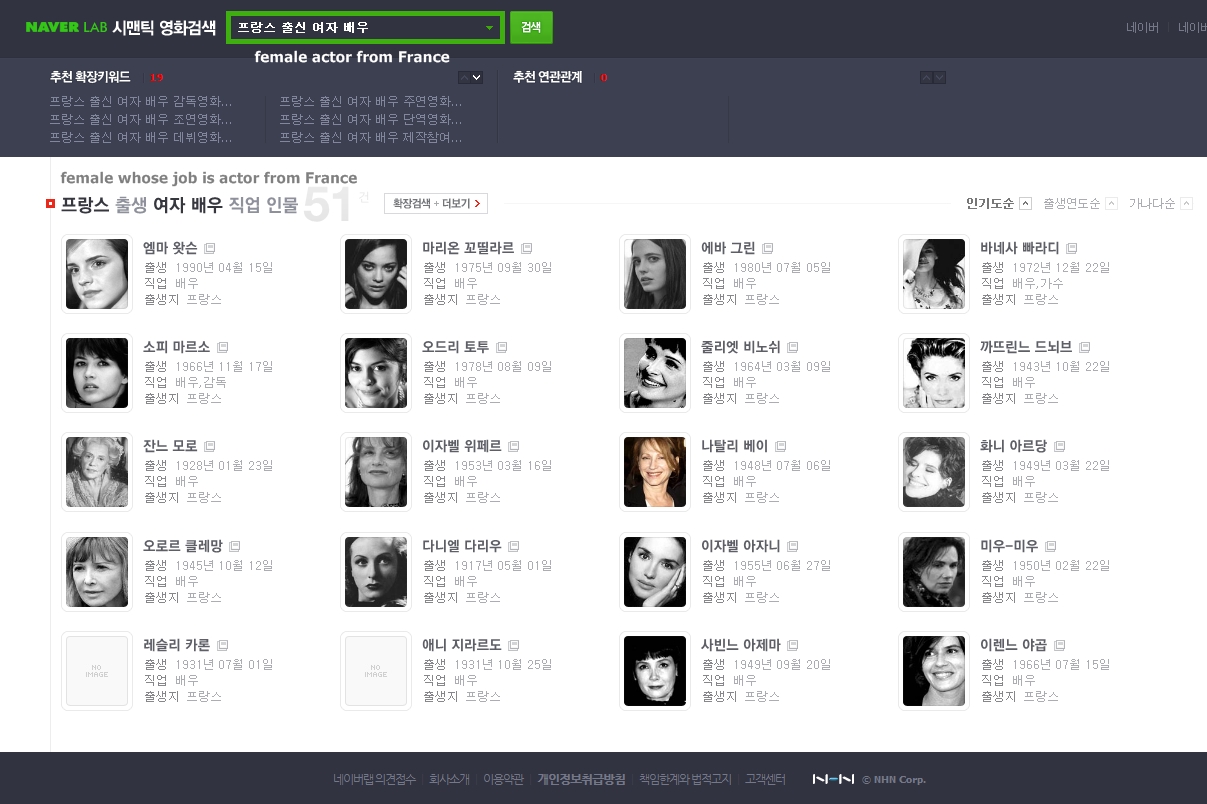
Fig1. The search result of "Actress from France"

Are you curious what actor or actress came from France? Are you curious what actor graduated from Stanford? What actor or actress came from the same school with me? What movies got 2010 academy awards? There are endless possible questions about the facts in the movie database. Actually all the answers of the above questions exist in the movie database like IMDB. However it's not easy at all to search for the answers for all the possible questions.


Fig 2. The search result of "2010 Korean action movie"

The keyword interface of NaverLab Semantic Movie Search provides for general users a way to easily search for the answers from database data. It functions like a restricted natural language interface. It is not a full natural language interface but accepts a multi-keyword query of the form of a noun phrase. The properties may be expressed as the adjectives or the propositional phrases attached to a noun.

Let's see another sample query "2010 action Korean movie" (Fig 2). '2010', 'action' and 'Korean' are properties applied to 'movie'. The query intent is obvious. The meaning is the movies that are produced in 2010, of action genre and made in Korea. Many interesting queries are possible by simply listing properties like this. This form of keyword query is easy for general users to understand and use.